
Create moving quotes – in minutes, not hours
Answer an enquiry quickly and cleanly and you win the job more often. With Xlado you create moving quotes from ready-made templates, take over customer data and the moving inventory automatically and send the quote by email – from the office or right at the customer's home.
- Templates for local, long-distance and fixed-price moves
- Line items, price lists and totals calculated automatically
- Turn the quote into an invoice with one click

What a good moving quote should include
A moving quote has to be easy for the customer to understand and properly calculated for your business. Unclear line items lead to discussions when the invoice arrives. These points should always be included:
Scope of services
From where to where, when and which service – for example a move, storage or a furniture transport.
Clear line items
Truck hours, labour hours, materials, dismantling and reassembly, parking suspension – each with quantity, unit and price.
Billing method
Fixed price or billing by actual effort – clearly defined for each service.
Optional services
Extras the customer can choose, shown separately and not included in the total.
Net and gross
Totals shown clearly, so private and business customers know exactly where they stand.
Terms and conditions
Your terms of business and insurance conditions – country-specific for international moves.
How a quote is structured in Xlado
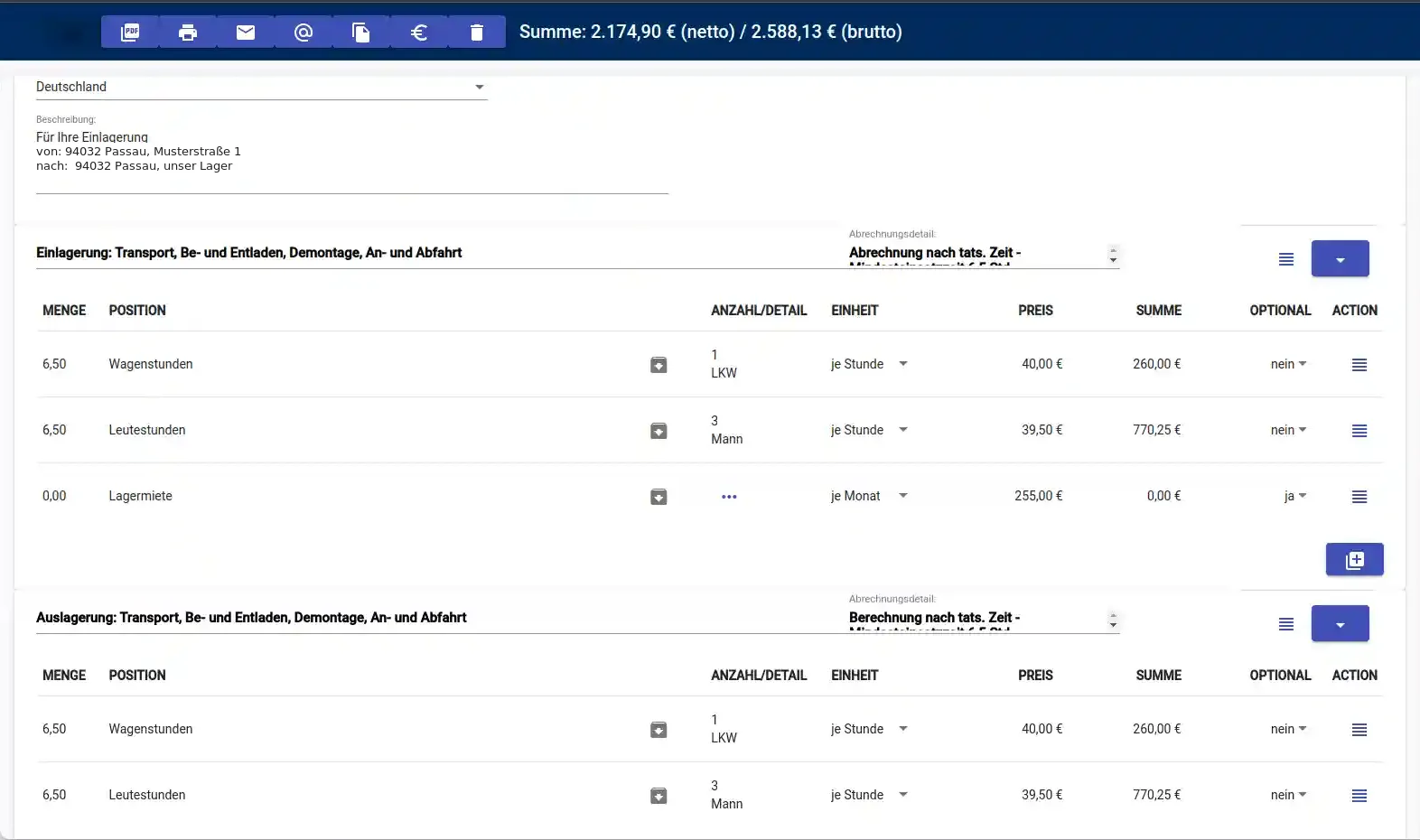
A quote consists of service blocks, such as “transport, loading and unloading, dismantling”. Each block has its own line items with quantity, count (e.g. 1 truck, 3 movers), unit and price – and its own billing detail, such as billing by actual time. The net and gross totals are always at the top and recalculate with every change.
- Several service blocks in one quote
- Mark line items as optional – without affecting the total
- Built-in price lists and predefined line items
- Save as PDF, print, send by email or copy
A template for every type of job
Instead of writing each quote from scratch, you start from a template and only change what's different. All templates can be tailored to your prices, texts and services.
Local move
Moves within town and the region.
Long-distance move
Multi-day moves over long distances.
Fixed price
Fixed-price quotes and flat-rate transports.
Bundeswehr
A dedicated template for relocations of German Armed Forces personnel.
For companies with many job types: software for removals companies.
From enquiry to invoice – without entering anything twice
Record the enquiry
Customer and enquiry go into the customer database – with address search and Google Maps.
Survey
The digital moving inventory provides volume, materials and crew size.
Create the quote
Choose a template; customer and inventory data are taken over, prices come from the price list.
Send
Send the quote automatically by email and archive it – even directly at the customer's home.
Schedule
Once accepted, schedule the move in dispatch.
Invoice
Generate the moving invoice from the quote with one click.
Still calculating quotes in spreadsheets? Read moving software vs. Excel: when switching pays off.
FAQ: moving quotes
More answers in the Xlado FAQ.
How do I create a moving quote with Xlado?
You choose a template (e.g. local, long-distance or fixed price), take over the customer data and moving inventory and adjust line items and prices. The finished quote goes to the customer as a PDF by email – even directly from the customer's home.
Fixed price or hourly billing – what's possible?
Both. There is a fixed-price template for flat-rate quotes. For billing by actual effort, you set the billing method for each service block, for example by actual time, and calculate truck hours and labour hours.
Can I offer optional services?
Yes. Line items can be marked as optional. They appear in the quote but are not included in the total – ideal for extras the customer can choose.
Does the quote turn into the invoice later?
Yes. You generate the moving invoice from the quote with one click. Line items, prices and customer data are taken over – nothing has to be entered again.
Is quoting free?
Yes. Quoting and invoicing are already included in the free basic plan of Xlado.
Write your next quote with Xlado
Quoting and invoicing are included in the free basic plan. Questions? Give us a call: +49 851 9860204
Get started for free